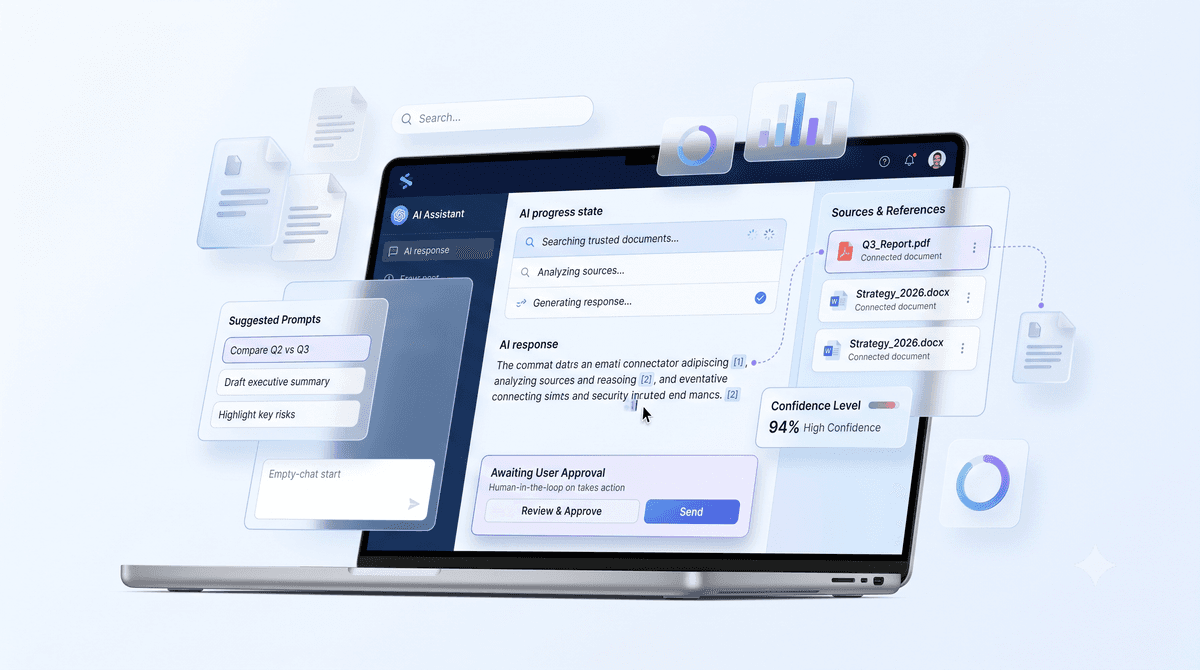
An AI assistant can give a perfect answer and still lose the user's trust if the interface feels like a black box. Good AI design makes three things visible: what the assistant is doing, where its answer came from, and what the user can do next.
Show Progress, Not Just a Spinner
AI responses take longer than a normal page load. Instead of a generic loader, show the steps as they happen: "Searching your documents", "Found 4 relevant passages", "Writing the answer". Users wait more patiently when they can see work being done.
Stream the answer word by word where you can. The first words appearing in under a second feels much faster than a complete answer after five.
Show Sources
When an answer is based on documents, cite them inline with small numbered markers and a list of sources underneath. Let users click through to the exact paragraph. Citations turn "the AI said so" into "here's the policy, section 2.1".
People trust answers they can check.
Be Honest About Uncertainty
- →Say when it doesn't know. "I couldn't find this in your documents" is better than a confident guess.
- →Flag low-confidence answers with a short note and a suggested next step.
- →Separate facts from suggestions so users know what came from their data and what's the model's idea.
Keep the User in Control
For assistants that take actions, like sending an email or issuing a refund, show a preview and an approval step before anything irreversible happens. Make it easy to edit, retry or undo. Control is what lets people hand over more work over time.
Design the Empty State
A blank chat box makes people guess what to ask. Offer three or four example prompts based on real tasks, like "Summarise this week's tickets" or "What's our refund window?". Good examples teach users what the assistant is for.
- ✓Visible steps while the assistant works
- ✓Streaming responses
- ✓Inline citations with clickable sources
- ✓Approval steps for actions
- ✓Example prompts in the empty state
These patterns are simple to build and make a big difference to adoption. They're the starting point for every AI interface the Devex Hub design team works on.
Want help putting this into practice?
We scope the use case with you, build it on your real data and stay on after launch.
Book a call